
SEOMURAI Documentation
Optimize content and images with precision.
Readability based on established formulas, keyword highlighting with regex, an image audit with alt text checks and bulk download, plus an optional Tracker Blocker. See the documentation overview.
Free in every SEOMURAI plan.
What the Content tab in SEOMURAI does
The quality of your content and visuals shapes the SEO impact of every page at least as strongly as pure technical cleanliness. The Content tab brings together the tools that work directly on the visible material: on the text and on the images.
Four subtabs belong here: Text Analysis, Keyword Highlighter, Image SEO and Image Analysis. You will find the optional Tracker Blocker under Extras.
When this menu is especially useful
- Before publishing any new copy, to check readability and structure.
- For systematic image audits of entire galleries, for example on magazines, online shops and travel portals.
- During research, when you want a quick assessment of how well a third-party page handles readability or image optimization.
- When you work on your own projects and do not want your test visits to end up in Google Analytics or comparable services.
- When you want to locate a specific keyword or pattern in the page text without scrolling through the whole page.
Step by step
1. Text Analysis: words, readability and trouble spots
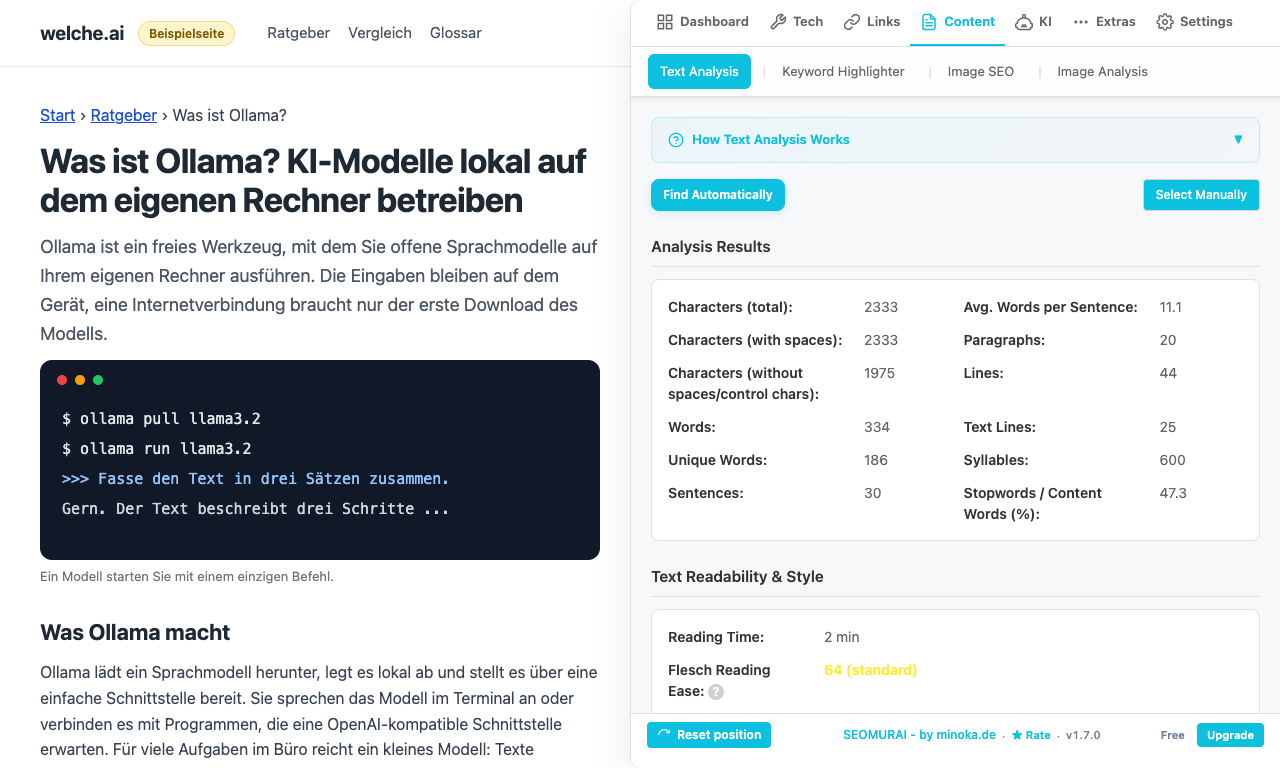
The Text Analysis subtab captures all visible text on the page and reports:
- Core metrics: words, characters, sentences, paragraphs, estimated reading time.
- Flesch readability: an international standard, comparable with values from other tools.
- Wiener Sachtextformel readability: designed specifically for German-language non-fiction, produces a school grade classification.
- Word frequency list: frequent terms ordered by occurrence, helps you spot hidden topical emphases.
- Warnings about overly long sentences and paragraphs: with the affected passages marked.
For text in scripts without word boundaries (Japanese, Chinese, Korean, Thai), the analysis automatically switches to Intl.Segmenter for correct word and sentence segmentation. Readability formulas that rely on the syllable structure of Latin-script languages are not meaningful there, so SEOMURAI deliberately marks them as not applicable with a short note instead of reporting a misleading number.
2. Keyword Highlighter: make search terms visible
The Keyword Highlighter marks your search terms directly on the page with a colored background. Enter one or more terms (separated by commas), or enable regex mode to match patterns (for example \b(SEO|search engine optimization)\b to catch both variants). The tool is useful for judging how your main keywords are distributed across the page, or for verifying whether a specific technical term appears at all.
You can save your own lists of frequently needed search terms and reuse them across projects, which spares you from typing them in again and again.
3. Image SEO and Image Analysis: check alt texts and image sizes
Two subtabs take care of the images on the page. Image SEO counts images without alt text, with empty alt text and without a title, and lists the affected images with a preview and their address. Image Analysis shows every <img> element on the page with:
- Original size versus display size: helps you spot images delivered at an unnecessarily large size.
- Type and address: filterable by address and minimum size.
The bulk download option lets you download selected images, or all of them, as a ZIP archive. The images are fetched through the extension’s background script, so CDN images with a strict CORS configuration work reliably as well.
4. Enable the Tracker Blocker (optional)
The Tracker Blocker, found under Extras, is disabled by default. Enable it only when you work on your own site and do not want your test visits to end up in Google Analytics, Google Tag Manager, the Facebook Pixel or comparable scripts. The blocker is built on declarativeNetRequest from Manifest V3, which means: no data collection on our side, no telemetry, just a plain filter rule in your browser.
Your own tools stay active: n8n webhooks, DataForSEO calls and requests to AI providers are not touched. The blocker specifically targets the known tracking scripts.
5. Apply your findings and check again
Apply the most important findings in your CMS (shorten sentences, add missing alt texts, replace oversized images), then reload the page and run the analysis again. The word frequency list, the readability scores and the image status are recalculated from scratch, so your progress is immediately visible.
Frequently asked questions
Tips and frequently asked questions
What counts as a “good” readability score?
For general-audience German-language non-fiction, a Wiener Sachtextformel score of around 8 to 9 (corresponding roughly to grade 8 to 9) reads well. Specialist publications typically score higher, editorial magazines lower. On the Flesch scale, a value of 60 to 70 is a reasonable target corridor for readable non-fiction in German.
Why do I not see a readability score for a Japanese or Chinese page?
The Flesch formula and the Wiener Sachtextformel rely on the syllable structure of Latin-script languages and are not meaningful for CJK scripts. Instead of a misleading number, SEOMURAI shows a short note in these cases. Word and sentence segmentation for CJK languages runs through the official browser API Intl.Segmenter, which means: the word count is correct, only the readability formula does not apply.
How does the bulk download work when the images come from a CDN?
SEOMURAI downloads the images through the extension’s background script, which is allowed to request any domain. As a result, CDN images with a strict CORS configuration work reliably as well. All selected images are then combined into a ZIP archive (using the embedded fflate library, roughly 8.7 KB), which you save through the browser dialog.
Does the Tracker Blocker silence your statistics completely?
It blocks the best-known tracking scripts (Google Analytics, Tag Manager, Facebook Pixel and comparable ones). Highly individual first-party trackers or server-side statistics (for example log file analysis) are deliberately not detected, because the blocker should not make guesses about third-party implementations. For the typical JavaScript trackers, however, the effect is reliable.
Can I share keyword lists between projects?
Yes. Save your lists once locally in SEOMURAI and export the configuration as a file via Settings → Backup & Restore. On a second device, or for a colleague, import that file and the lists are immediately available there.
More topics in the documentation
Jump straight to the detail page for another menu.
- Overview: getting started with SEOMURAI
- Dashboard: score, Key Issues and Quick Actions
- Tech SEO: Meta, Schema, Headings and seven more subtabs
- Links: Statistics, Analyse, Duplicates, Outlink Checker
- KI: LLMS.TXT Info and PRO modules
- DataForSEO: SERP, keywords, domain data and backlinks (BYOK)
- External checkers: W3C validator, Rich Results Test and context menu
- Settings: language, API keys, backup and account
Want to try this feature directly in your browser?
Install SEOMURAI and take five minutes for a content and image inventory of your most important page.