
SEOMURAI Documentation
Analyze internal and external linking systematically.
The Links tab delivers the complete evaluation of all hyperlinks on a page, from the distribution of internal and external references and live status checking to the analysis of URLs that are linked more than once. Go to the documentation overview.
Four modules free of charge, two more in the PRO plan.
What the Links tab in SEOMURAI does
Alongside content and technology, linking is the third pillar of on-page optimization. Thoughtful internal linking distributes authority sensibly, curated external linking builds trust, and a clean link profile without dead or broken references keeps Google and your users from running into dead ends.
The Links tab analyzes all <a> tags in the visible area of the page and organizes the evaluation into four free modules: Statistics, Analyse with live status checking, Duplicates and Outlink Checker. In the PRO plan, Link Heatmap and Sitemap Explorer extend the evaluation.
When this menu is especially useful
- When building and continuously maintaining the internal linking of large websites.
- Before every migration and every CMS switch, to compare the link inventory before and after the change.
- After every major content update, to make sure no external links point to 404 pages.
- During research, when you want to see quickly how a competing page builds its internal link structure.
- When you want to review the anchor text variety of a page or uncover duplicate links that use different anchor texts.
Step by step
1. Statistics: the link profile at a glance
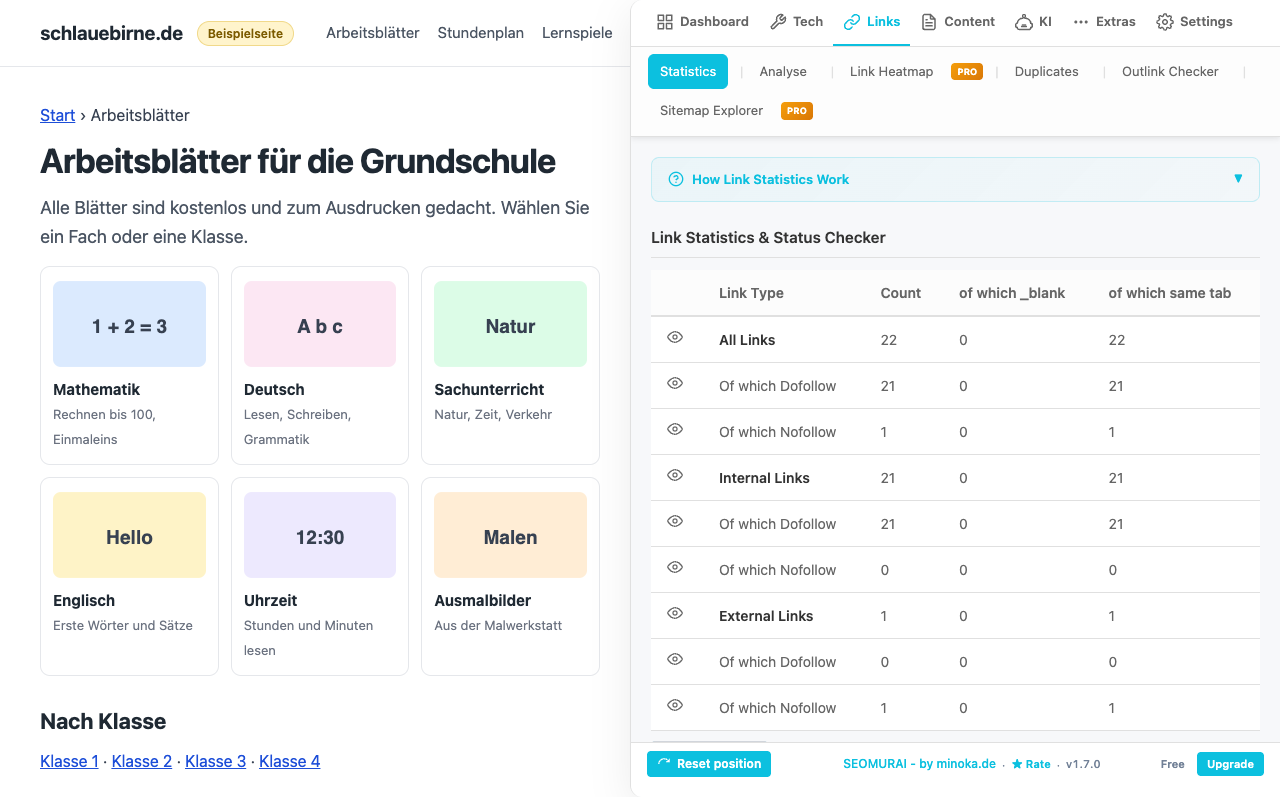
The Statistics sub-tab delivers the quantitative overview: the total number of links, the split into internal and external references, dofollow and nofollow shares, and the number of distinct domains and distinct anchor texts. These figures are the foundation for every deeper evaluation and tell you immediately whether the page is built more referentially (many external links) or more centrally (predominantly internal references).
2. Analyse: check every link individually
The Analyse sub-tab lists every single link on the page with its URL, anchor text, type (internal, external), attributes (rel, target) and an optional live status check. The table can be filtered and sorted, so you can isolate, for example, all external nofollow links or all internal references to a specific path hierarchy.
The live status check starts a concurrent background check of all links: several requests are sent in parallel per second, and every link receives its HTTP status (200, 301, 404, 500 and so on). You can cancel the check at any time, and the progress is displayed in the table in real time.
3. Duplicates: detect repeated references
The Duplicates sub-tab identifies URLs that are linked several times from the same page. These are often references with different anchor texts (a logo plus a footer link plus an inline link to the home page, or a brand name plus a product-related anchor pointing to the same target). Comparing the anchor texts side by side shows you whether the repeated linking is intentional and serves a clear purpose, or whether it grew editorially and is unintended.
4. Outlink Checker: verify specific links
The Outlink Checker answers a very specific question: does the page contain a link to a particular target URL? You enter one or more URLs, SEOMURAI checks whether the current page contains at least one link to each of these addresses, and it presents the result as a compact list. This is very useful for reliably verifying partner links, source citations or required links from advertising partnerships.
5. Export tables
From every sub-tab you can download the respective table as a CSV file to process the data further in spreadsheets, reporting tools or your own evaluations. The CSV export of the Links modules is part of the PRO plan, since it typically produces extensive data that feeds into audit reports. The DataForSEO export is not affected by this and remains available in the free plan as well.
6. Advanced evaluations in the PRO plan
If you want to deepen your link analysis, two PRO modules unlock additional perspectives: the Link Heatmap colors your links by their distance to the nearest link and rates size and distance following Fitts’ Law, and the Sitemap Explorer reads XML sitemaps and extracts URL lists for cross-page evaluation. Both features are described in detail on their own dedicated pages.
Frequently asked questions
Tips and frequently asked questions
What do dofollow and nofollow mean in the link profile?
dofollow is the default and tells search engines that the link should be followed. nofollow is set via the rel="nofollow" attribute and signals to search engines that they should not pass additional trust to the link in their evaluation. This makes sense for paid or user-generated links. External linking that is heavily weighted toward nofollow can indicate that a page does not clearly separate advertising or forum links.
Why does the live status check take so long?
The check is concurrent (several parallel requests) and includes a timeout per link so that a single slow server does not block the entire check. On a page with hundreds of links, the process can still take a minute or longer. You can cancel the check at any time, and all links checked up to that point remain in the table.
Are links from the header and footer counted as well?
Yes. SEOMURAI counts all <a> tags in the <body> area of the page, including the header, footer and sidebar. If you only want to see the linking within the main content, use the filter in the Analyse sub-tab (for example by path prefixes or by internal versus external links).
Does SEOMURAI also detect links generated by JavaScript?
Yes, as long as the links are present in the DOM when you open SEOMURAI. For pages with heavily dynamically loaded content, it is worth scrolling and waiting until the page has fully finished rendering, and only then opening SEOMURAI. When you open it again, the analysis is completely recalculated.
Does the Outlink Checker work with several target URLs at once?
Yes. You can paste any number of URLs, one per line. SEOMURAI checks all of them in a single evaluation and shows for each target URL whether a link was found. This is practical when verifying several required links from a single advertising agreement or when maintaining a list of sources.
More topics in the documentation
Jump directly to the detail page for another menu.
- Overview: Getting started with SEOMURAI
- Dashboard: score, Key Issues and Quick Actions
- Tech SEO: Meta, Schema, Headings and seven more subtabs
- Content: Text Analysis, Keyword Highlighter, Image SEO, Image Analysis
- KI: LLMS.TXT Info and PRO modules
- DataForSEO: SERP, Keywords, Domain data and Backlinks (BYOK)
- External checkers: W3C validator, Rich Results Test and context menu
- Settings: Language, API keys, backup and account
Want to try this feature directly in your browser?
Install SEOMURAI and check the linking of your most important pages in just a few minutes.