
Free Chrome Extension
Open Hundreds of URLs in Seconds, Not Hours
The bulk URL opener built for SEO professionals, researchers, and digital marketers — open, organize, and manage large URL lists without juggling tabs.
Powerful free version · Available in 12 languages · Light & dark mode
Why bulkU
Stop Wasting Hours on Manual URL Opening
See how bulkU transforms a daily URL workflow from tedious manual work into instant automation.
Without bulkU
- Copy each URL individually
- Open a new tab manually
- Paste the URL in the address bar
- Press Enter
- Repeat 50–500 times
- Lose focus and momentum
- Waste time every single day
With bulkU
- Paste the entire URL list at once
- Click “Open Selected”
- Done in seconds
- Get that time back every day
- Stay focused on the real work
- Batch process 500+ URLs instantly
- Work smarter, not harder
Features
Everything You Need to Manage URLs
Powerful capabilities designed for professionals who work with URLs at scale.
🚀 Open 500+ URLs Instantly
Paste a URL list and open every tab with one click. Process hundreds of URLs in seconds with smart batch processing and configurable delays.
✏️ WordPress Editor Shortcut
Convert post URLs to editor URLs automatically. Open 50+ WordPress posts in edit mode at once — perfect for content updates and SEO work.
🗂️ Organize URLs in Groups
Save URL lists as named groups for projects, clients, or campaigns. Five groups on the free plan, unlimited on Pro.
⚙️ Control Opening Speed
Set delays between tabs to prevent browser overload. Open in configurable batches with pause and resume — safe for processing 100+ URLs at a time.
🎯 Auto-Remove Duplicates
Automatic duplicate filtering with smart normalization. Handles different protocols, trailing slashes, and case variations to keep every list clean.
📥 Import from Files
Import URLs from TXT, CSV, or JSON. Export groups for backup or sharing with your team. UTF-8 support and large-file processing included.
✂️ Extract URLs from Text
Paste mixed text from emails, spreadsheets, or notes. bulkU pulls out the URLs and filters email addresses and trailing punctuation automatically.
🔀 Drag & Drop, Multi-Select
Reorder URLs by dragging. Shift-click for range selection, then bulk-delete with an 8-second undo toast for safe editing.
🌙 Easy on Your Eyes
Beautiful dark mode for late-night work, syncing automatically with system preferences. WCAG 2.1 AA compliant contrast ratios.
⌨️ Keyboard Shortcuts PRO
Open favorite URL groups with custom keyboard shortcuts. Press Ctrl+Shift+1 for Group 1, Ctrl+Shift+2 for Group 2, and so on.
📝 URL Notes PRO
Add notes to any URL for context, reminders, or to-dos. Track why a URL was saved, what to check, or which deadline applies.
⏰ Auto-Open Scheduling PRO
Schedule URL groups to open automatically on a daily or weekly cadence. Open morning news at 8 AM, work tools at 9 AM, dashboards every hour.
Built For Professionals
Who bulkU Is Built For
Three workflows where opening URLs at scale moves the entire job forward.
SEO Professionals
Audit Faster, Rank Higher
- Competitor Analysis: Export 100+ competitor URLs from Ahrefs or SEMrush, then open every page instantly to analyze content and keywords.
- Backlink Audits: Pull a backlink list from any SEO tool and open the linking pages all at once to verify quality and relevance.
- SERP Review: Check Google rankings for 50+ keywords by opening the top 10 results simultaneously.
- Content Updates: Open 50+ WordPress posts in edit mode with a single click using the WP Editor shortcut.
- Site Audits: Open every page from a sitemap to spot technical issues or outdated content.
Researchers & Students
Research Smarter, Not Harder
- Literature Reviews: Open 50+ academic papers from Google Scholar or PubMed simultaneously for comprehensive research.
- Source Comparison: Review multiple research sources side by side for thesis work and citations.
- Reading Lists: Organize 100+ papers by topic in separate groups (Biology, Chemistry, etc.).
- Citation Management: Quick access to bookmarked articles from Zotero or Mendeley exports.
- Reference Checking: Open every reference from a bibliography to verify sources instantly.
Digital Marketers
Campaign Management Made Easy
- Campaign Monitoring: Check 20+ landing pages across multiple campaigns in one go.
- Competitor Research: Monitor competitor ads from Facebook Ads Library, Google Ads, and LinkedIn.
- Client Reporting: Open every client website for monthly performance reviews and audits.
- Social Media Audits: Batch-check 50+ social media profiles across LinkedIn, X, and Instagram.
- A/B Testing: Open every test variant simultaneously to compare designs and copy.
Pricing
Choose Your Plan
Start free. Upgrade when the workflow demands more.
Free
- 5 URL groups
- 150 URLs per group
- Bulk opening
- Duplicate removal
- Import & export
- Batch control
- Dark mode
Pro
- Everything in Free
- Unlimited groups
- Unlimited URLs
- Keyboard shortcuts
- URL notes
- Scheduled opening
- Priority support
- Early access to new features
30-day money-back guarantee · Limited-time launch pricing
| Feature | Free | Pro |
|---|---|---|
| Groups | 5 | ∞ |
| URLs per group | 150 | ∞ |
| Bulk opening | ✓ | ✓ |
| Keyboard shortcuts | — | ✓ |
| URL notes | — | ✓ |
| Scheduled opening | — | ✓ |
| Priority support | — | ✓ |
How It Works
Up and Running in Three Steps
From install to opening the first URL list in under five minutes.
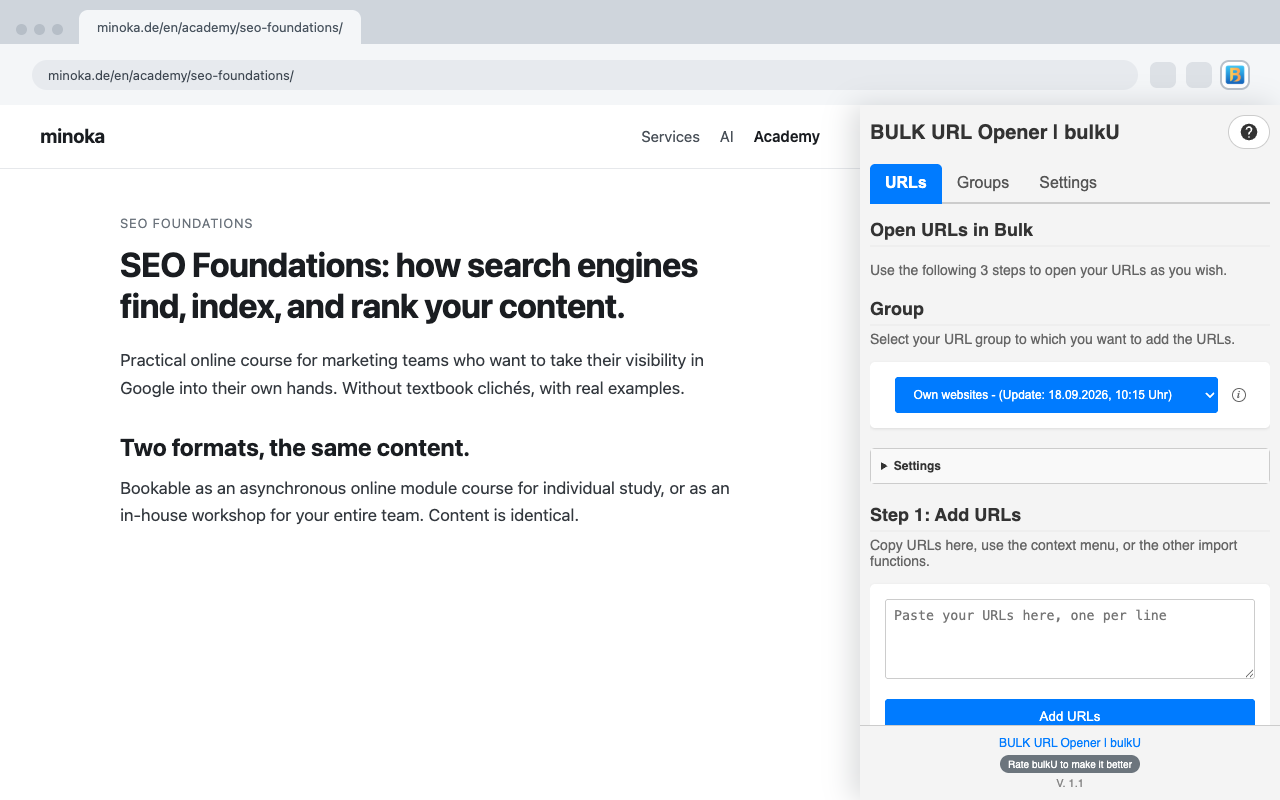
Add URLs
Paste a URL list, import from a file, or capture currently open browser tabs. bulkU accepts any valid URL.
Configure
Choose opening speed, set the batch size, pick the destination group. Configure once and reuse the setting.
Open All
Click one button. Every tab opens in seconds. Pause, resume, or cancel at any time.
FAQ
Frequently Asked Questions
Everything you need to know about bulkU.
How does bulkU work?
Paste a list of URLs into the extension, set delay and batch size, then click Open Selected. bulkU opens every URL in a new tab automatically. The process can be paused, resumed, or cancelled at any time.
Is bulkU really free?
Yes. The free plan covers the core workflow: 5 groups, 150 URLs per group, bulk opening, duplicate removal, import and export, and dark mode. Pro adds unlimited groups and URLs, plus keyboard shortcuts, URL notes, and scheduled opening.
How many URLs can I open at once?
Free users can open up to 150 URLs per group. Pro users have no limit. For lists above 100 URLs, batch processing with delays is recommended to keep the browser responsive.
Will opening many URLs crash the browser?
No. bulkU uses smart batch processing with configurable delays between tabs. This prevents browser overload and keeps the workflow smooth even with 500+ URLs.
Can I organize URLs into different lists?
Yes. Named groups separate URLs by project, client, or campaign. Free users get five groups, Pro users get unlimited groups.
Does bulkU work with all websites?
Yes. bulkU accepts any valid URL — HTTP, HTTPS, and local file:// URLs. Some sites have their own restrictions on automated access, but bulkU respects all browser security policies.
Can I import URLs from a file?
Yes. bulkU imports from TXT, CSV, and JSON files. Groups can also be exported for backup or for sharing with team members.
Which browsers are supported?
bulkU runs on Google Chrome and Microsoft Edge. The extension works on Windows, macOS, and Linux.
Is my data safe?
Yes. URL groups and settings are stored locally in the browser. bulkU does not send data to external servers. Privacy is the default.
Which languages does bulkU support?
bulkU is available in twelve languages: English, German (Deutsch), Spanish (Español), French (Français), Italian (Italiano), Dutch (Nederlands), Polish (Polski), Portuguese (Português), Brazilian Portuguese (Português Brasil), Turkish (Türkçe), Japanese (日本語), and Simplified Chinese (简体中文). The interface adapts automatically to the browser language.
How do I upgrade to Pro?
Click Upgrade to Pro inside the extension or on this page. The payment page opens in a secure tab. After payment, Pro features activate instantly inside the extension.
Ready to Save Hours Every Day?
Install bulkU today and transform the way you manage URLs. Free to install, free for the core workflow, no account required.
Powerful free version · Available in 12 languages